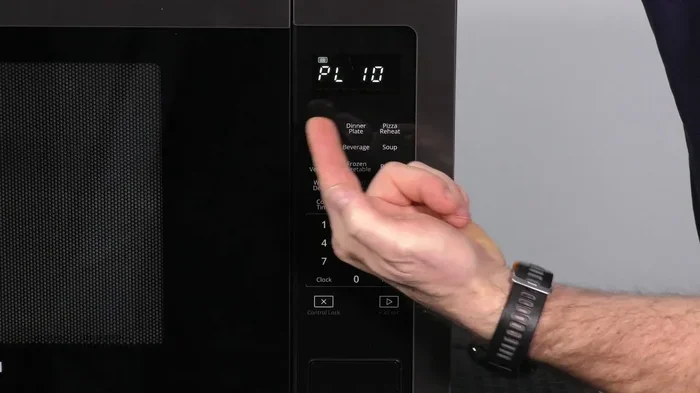
How To Reset A Whirlpool Microwave Oven Step By Step
Learning how to reset a Whirlpool microwave oven is easier than most people think. Whether your microwave is showing error codes, the keypad is unresponsive, or the settings are stuck, a simple reset can solve the problem in minutes. This step-by-step guide covers soft resets, hard resets, and model-specific methods so you can get your Whirlpool microwave back to normal without calling a technician.
Your Whirlpool microwave oven is one of the most relied-upon appliances in your kitchen. You use it to reheat leftovers, cook quick meals, and defrost ingredients in a hurry. But what happens when it suddenly stops working properly? The display goes blank, the buttons stop responding, or an error code flashes on the screen. It can be frustrating, especially when you have food to prepare.
The good news is that most microwave issues are fixable with a simple reset. Resetting a Whirlpool microwave oven is a straightforward process that does not require any special tools or technical skills. Whether you own a countertop model or an over-the-range unit, the steps are similar and easy to follow. In this guide, we walk you through every method, so you can get your microwave running again quickly and safely.
Key Takeaways
- A soft reset fixes minor glitches by simply turning the microwave off and on again.
- A hard reset requires unplugging the microwave for several minutes to fully clear the control board.
- Resetting specific Whirlpool models may involve different button combinations or panel resets.
- Error codes on your display often indicate a reset is needed or a deeper issue to address.
- Preventive maintenance like regular cleaning and power surge protection helps avoid future problems.
- Call a professional if the microwave still malfunctions after a full reset and troubleshooting.
📑 Table of Contents
- Why You Might Need to Reset Your Whirlpool Microwave Oven
- How To Reset A Whirlpool Microwave Oven Step By Step
- Resetting Specific Whirlpool Microwave Models
- Troubleshooting Common Issues After a Reset
- Preventive Tips to Avoid Future Microwave Issues
- When to Call a Professional
- Key Takeaways
- Frequently Asked Questions
- Conclusion
Why You Might Need to Reset Your Whirlpool Microwave Oven
Microwaves are built to last, but they are not immune to occasional glitches. A reset clears the internal memory and restores the microwave to its default settings. Think of it like restarting a computer when it starts acting up. The control board processes a lot of information, and sometimes it just needs a fresh start.
Common Signs Your Microwave Needs a Reset
Before you dive into the reset process, it helps to recognize the signs that a reset is needed. Here are the most common indicators:
- The display screen is blank or flickering. This often means the control board has frozen and needs a power refresh.
- The keypad is unresponsive. If pressing buttons does nothing, the control panel may be locked or glitching.
- Error codes appear on the display. Whirlpool microwaves show specific codes when something is wrong. A reset can clear temporary faults.
- The microwave stops mid-cycle. If your microwave shuts off unexpectedly during cooking, a reset may resolve the issue.
- Unusual sounds or smells. While these could indicate a serious problem, a reset can help rule out electronic glitches first.
- The clock or settings keep resetting. This suggests the control board memory needs to be cleared and restored.
If you notice any of these issues, do not panic. A Whirlpool microwave troubleshooting reset solves the majority of these problems. It is always the first step before trying anything more complex.
How To Reset A Whirlpool Microwave Oven Step By Step
There are two main ways to reset a Whirlpool microwave oven: the soft reset and the hard reset. Each method serves a different purpose. The soft reset is quick and handles minor issues. The hard reset is more thorough and clears deeper problems from the control board. Let us go through both methods in detail.
The Soft Reset Method
A soft reset is the simplest and fastest way to troubleshoot your microwave. It works like restarting a phone or a laptop. You are not opening anything or disconnecting any wires. You are simply giving the microwave a fresh start through its power controls.
Here is how to do it:
- Press the Cancel or Clear button. This turns off any active cooking cycle. Hold it for about three seconds to make sure the microwave fully stops.
- Unplug the microwave from the wall outlet. Wait at least one minute. This allows the internal capacitors to discharge and the control board to reset.
- Plug the microwave back in. Wait for the display to light up. You should see the clock or the home screen.
- Set the clock if needed. Some models require you to reset the clock after a power cycle. Simply press the Clock button and enter the correct time.
- Test the microwave with a simple task. Heat a cup of water for 30 seconds. If it works normally, the soft reset was successful.
This method resolves most minor issues like frozen displays, unresponsive buttons, and temporary error codes. It takes less than five minutes and does not require any technical knowledge.
The Hard Reset Method
A hard reset goes deeper than a soft reset. It fully powers down the microwave and clears all stored settings and error codes from the control board. Use this method when the soft reset does not work or when the microwave has been experiencing persistent problems.
Here is how to perform a hard reset:
- Turn off the microwave using the Cancel or Off button. Make sure it is not in the middle of a cooking cycle.
- Unplug the microwave from the electrical outlet. Do not just turn it off at the socket. Physically pull the plug out to ensure a complete power disconnect.
- Press and hold the Start button for 10 seconds. This drains any residual power from the capacitors inside the microwave. It is an important safety step.
- Wait for at least five minutes. This gives the control board enough time to fully reset. Some experts recommend waiting up to ten minutes for stubborn issues.
- Plug the microwave back into the outlet. Wait for the display to activate.
- Reset the clock and any custom settings. The microwave will return to its factory default settings after a hard reset.
- Run a test cycle. Heat a small bowl of water for one minute. Check that the microwave heats properly and the controls respond normally.
The hard reset clears almost all temporary faults. If your microwave was showing error codes like F1, F2, or F9, there is a good chance a hard reset will clear them. However, if the error codes return immediately, there may be a hardware issue that needs further attention.
Resetting Specific Whirlpool Microwave Models
Whirlpool makes many different microwave models, and some of them have unique reset procedures. While the general methods above work for most units, certain models benefit from model-specific steps. Let us look at the most common types.
Resetting a Whirlpool Countertop Microwave
Countertop microwaves are the most popular Whirlpool models. They sit on your kitchen counter and plug directly into a wall outlet. The reset process for these models is the same as the methods described above. However, a few additional tips can help:
- Check the power outlet. Sometimes the outlet itself is the problem. Try plugging the microwave into a different outlet to rule out electrical issues.
- Look for a reset button on the control panel. Some Whirlpool countertop models have a dedicated Reset button near the Clock or Express Cook buttons.
- Remove any cooking accessories before resetting. Take out the turntable and any glass plate. This ensures nothing interferes with the reset process.
Resetting a Whirlpool Over-the-Range Microwave
Over-the-range microwaves are mounted above your stove and serve as both a microwave and a ventilation fan. These models have a slightly different reset process because they are hardwired or connected to a dedicated circuit.
- Turn off the circuit breaker. Unlike countertop models, over-the-range microwaves often connect to a home electrical panel. Switch off the breaker that powers the microwave.
- Wait for five minutes. This gives the control board a full reset.
- Turn the breaker back on. The microwave should power up normally.
- Press the Reset button if your model has one. Many over-the-range Whirlpool microwaves include a reset function on the control panel.
- Check the exhaust fan and lights. After resetting, make sure all functions work, not just the microwave heating.
Resetting a Whirlpool Built-In Microwave
Built-in microwaves are installed into kitchen cabinets and are often part of a larger appliance panel. Resetting these models typically involves the same unplug-and-wait method. However, because they are hardwired, you may need to turn off the corresponding breaker at the electrical panel. Always consult your owner’s manual for model-specific reset instructions.
Troubleshooting Common Issues After a Reset
A reset solves many microwave problems, but sometimes issues persist. Here is how to handle common problems that continue even after you reset your Whirlpool microwave oven.
Microwave Still Not Working After Reset
If your microwave does not power on after a reset, check a few things before calling for help:
- Verify the power outlet is working. Plug in another appliance to test the outlet.
- Check the microwave door latch. Microwaves have safety switches that prevent operation if the door is not fully closed. Open and close the door firmly and try again.
- Inspect the power cord. Look for visible damage, fraying, or burn marks on the cord.
- Check your home’s circuit breaker. A tripped breaker can cut power to the microwave without you noticing.
Error Codes on Whirlpool Microwaves
Whirlpool microwaves display error codes to help you identify problems. Here are the most common codes and what they mean:
- F1 or F2: These codes typically indicate a problem with the control board or the temperature sensor. A reset often clears these codes. If they return, the sensor or board may need replacement.
- F3: This points to a door switch issue. The microwave detects that the door is not properly closed or a switch is faulty.
- F4 or F5: These relate to the humidity or moisture sensor. Cleaning the sensor area with a dry cloth can sometimes resolve the issue.
- F6 or F7: These codes suggest a keypad or control panel malfunction. A hard reset usually fixes this. If not, the keypad may need replacement.
- F9: This code is common in some Whirlpool models and indicates a communication error between the control board and the display. A reset typically resolves it.
Always write down the error code before performing a reset. This helps you track whether the code returns after the reset, which tells you if the problem is temporary or requires a part replacement.
The Microwave Beeps Continuously After Reset
If your microwave keeps beeping after a reset, it is usually trying to get your attention. This often happens when the clock has not been set, or a button was pressed accidentally during the reset process. Simply set the clock and press the Clear button to stop the beeping. If the beeping continues, try the hard reset method again and make sure you hold the Start button for the full 10 seconds during the process.
Preventive Tips to Avoid Future Microwave Issues
Prevention is always better than repair. A few simple habits can keep your Whirlpool microwave oven running smoothly and reduce the need for resets.
- Clean the interior regularly. Food splatters and grease buildup can cause odors, smoke, and even affect the microwave’s performance. Wipe down the interior at least once a week.
- Use microwave-safe containers only. Metal, aluminum foil, and certain plastics can cause arcing and damage the microwave. Always check the bottom of containers for the microwave-safe label.
- Do not run the microwave empty. Running a microwave with nothing inside can damage the magnetron, which is the component that generates heat. Always place something inside before turning it on.
- Protect against power surges. Use a surge protector or plug your microwave into a surge-protected outlet. Power surges can fry the control board and cause error codes.
- Keep the ventilation vents clear. Over-the-range microwaves have exhaust vents that can get clogged with grease. Clean them regularly to prevent overheating.
- Handle the door gently. Slamming the door can damage the safety switches and the door latch mechanism. Close the door softly and make sure it latches properly every time.
- Follow the manufacturer’s guidelines. Read the owner’s manual for your specific Whirlpool model. It contains valuable information about care, maintenance, and troubleshooting.
These Whirlpool appliance care tips go a long way in extending the life of your microwave. A well-maintained microwave is less likely to need frequent resets or repairs.
When to Call a Professional
Most microwave issues resolve with a simple reset. But there are times when professional help is necessary. Do not attempt to open the microwave casing or repair internal components yourself. Microwaves contain high-voltage parts that can be dangerous even when unplugged.
Call a certified Whirlpool technician if:
- The microwave still does not work after a full hard reset. This could indicate a failed control board, a broken magnetron, or a damaged power supply.
- You see sparks or smoke inside the microwave. Turn it off immediately, unplug it, and call a professional. These are signs of serious internal damage.
- The door does not close or latch properly. A damaged door seal can cause microwave radiation leakage, which is a safety hazard.
- The microwave makes loud grinding or buzzing noises. These sounds often indicate a failing motor or a worn-out turntable drive.
- Error codes persist after multiple resets. Repeated error codes suggest a hardware component has failed and needs replacement.
- The microwave is under warranty. Attempting DIY repairs can void your warranty. Always contact Whirlpool support first.
A professional technician has the tools, training, and replacement parts to fix your microwave safely and correctly. It is always better to spend a little money on a service call than to risk injury or cause further damage to your appliance.
Key Takeaways
- A soft reset fixes minor glitches by simply turning the microwave off and on again through the control panel.
- A hard reset requires unplugging the microwave for five to ten minutes to fully clear the control board memory.
- Resetting specific Whirlpool models may involve different button combinations or breaker switches for over-the-range units.
- Error codes like F1, F3, and F9 often indicate a reset is needed or a component that requires inspection.
- Preventive maintenance such as regular cleaning and surge protection helps avoid future microwave problems.
- Call a professional if the microwave still malfunctions after a full reset or shows signs of serious damage.
Frequently Asked Questions
How long should I unplug my Whirlpool microwave to reset it?
For a soft reset, unplug the microwave for at least one minute. For a hard reset, wait five to ten minutes. The longer wait time allows the control board to fully clear all stored data and error codes. This ensures a complete reset of the microwave’s internal systems.
What should I do if the Whirlpool microwave reset button does not work?
If your model has a reset button and it does not respond, try the manual unplug-and-wait method instead. This hard reset approach bypasses the control panel and forces a full system reboot. If that also fails, the control board itself may need to be replaced by a professional technician.
Can I reset my Whirlpool microwave without unplugging it?
Yes, you can perform a soft reset without unplugging the microwave. Simply press the Cancel or Clear button, turn the microwave off using the power switch if it has one, and wait two minutes before turning it back on. This method works for minor glitches but is less thorough than a hard reset.
Why does my Whirlpool microwave keep showing error codes after a reset?
Recurring error codes after a reset usually indicate a hardware problem rather than a software glitch. The sensor, control board, or a specific component may be failing. In this case, it is best to contact Whirlpool customer support or a certified technician for a proper diagnosis and repair.
Is it safe to reset a Whirlpool microwave by myself?
Yes, it is completely safe to reset your Whirlpool microwave by yourself. Both the soft reset and hard reset methods involve only unplugging the unit or using the control panel. You do not need to open the microwave or touch any internal components. Always make sure your hands are dry and you are standing on a dry surface when working with any electrical appliance.
Will resetting my Whirlpool microwave erase my custom settings?
A hard reset will erase all custom settings, including the clock, cooking presets, and any saved preferences. You will need to reconfigure these after the reset. A soft reset typically preserves most settings but may clear temporary error codes and active cooking cycles.
Conclusion
Resetting a Whirlpool microwave oven is one of the simplest and most effective ways to troubleshoot common problems. Whether your microwave is showing error codes, the keypad is not responding, or it simply stopped working, a reset can bring it back to life in just a few minutes. The soft reset method is perfect for quick fixes, while the hard reset method handles deeper issues by fully clearing the control board.
Remember to follow the steps carefully and never attempt to open the microwave casing or repair internal components on your own. Use the preventive tips in this guide to keep your microwave in great shape and reduce the chances of future problems. And if the issue persists after a reset, do not hesitate to call a professional technician for help.
With this step-by-step guide, you now have the knowledge to handle most Whirlpool microwave issues on your own. Reset your Whirlpool microwave oven with confidence, and enjoy a fully functioning kitchen appliance for years to come.