How To Program Cuisinart 14 Cup Coffee Maker Easily
Want to master your Cuisinart 14 cup coffee maker? This guide walks you through programming your coffee maker in just a few simple steps. You’ll learn how to set auto brew, adjust brew strength, and use the pause and pour feature like a pro.
Making great coffee starts with how to program Cuisinart 14 cup coffee maker correctly. This powerful drip machine lets you wake up to a fresh pot without lifting a finger. You can set a 24-hour programmable timer, choose your brew strength, and use the pause and pour feature. If you ever need a quick cup without the machine, check out our how to make coffee in microwave oven guide. In this guide, we break down every step so you can master your programmable coffee maker with confidence. Follow along and turn your morning routine into a breeze.
Programming your cuisinart 14 cup machine is simpler than you think. The control panel looks busy, but each button has a clear purpose. Once you learn the layout, you will program your coffee maker in just minutes. This article covers every setting, from the clock to the brew strength selector. You will also find maintenance tips and quick fixes for common problems. Let us walk you through the entire process.
Key Takeaways
- Easy Programming: Set a 24-hour programmable timer and wake up to fresh coffee every morning.
- Custom Brew Strength: Choose between regular and bold cups to match your taste.
- Pause and Pour: Grab a cup mid-brew without making a mess or stopping the cycle.
- Simple Maintenance: Clean the water reservoir and replace the charcoal filter regularly for the best flavor.
- Troubleshooting Tips: Fix common programming errors quickly and get your machine running again.
- Pro Hacks: Use the right coffee grounds-to-water ratio and the keep warm setting for perfect results.
📑 Table of Contents
Understanding Your Cuisinart 14 Cup Coffee Maker
Before you press any button, it helps to know what each part does. The cuisinart coffee maker settings are designed to be intuitive. Let us look at the control panel and the key features that make this machine so popular.
The Control Panel Layout
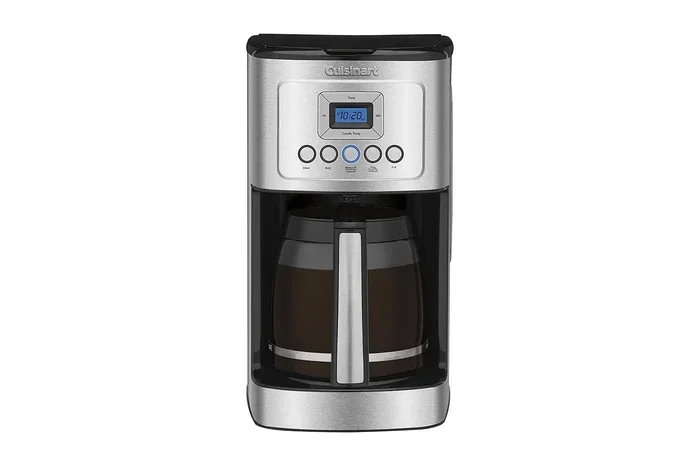
The front of the machine has a small digital display and a set of buttons. You will see the coffee maker buttons for program, brew now, and strength. There is also a clock display and indicator lights for auto brew and keep warm. The programmable timer button lets you set a future brew time. The brew now button starts the cycle immediately. The strength button toggles between regular and bold. The pause and pour button lets you remove the pot mid-cycle. Each coffee maker manual will show these same controls, so you can always refer back to it.
Key Features You Will Love
This machine comes packed with features that make daily coffee simple. The 24-hour programmable timer means you can set it up the night before. The auto brew function starts the pot at your chosen time. The brew strength control lets you pick a lighter or stronger cup. The gold tone reusable filter saves money and reduces waste. The charcoal water filter removes impurities for better tasting coffee. The keep warm setting holds your pot at the right temperature for hours. The coffee pot capacity holds 12 cups, perfect for families or guests. The water reservoir is easy to fill and has clear measurement marks. These features work together to give you a perfect drip coffee experience every time.
Step-by-Step Programming Guide
Now that you know the parts, let us program the machine. Follow these steps carefully for a flawless setup. The process takes only a few minutes. You will be able to enjoy morning coffee without any hassle.
Setting the Clock and Timer
First, you need to set the correct time. Press the program button until the clock display flashes. Use the hour and minute buttons to set the current time. Press program again to save the time. The 24-hour programmable timer will now be ready. You can set a future brew time by pressing the auto brew button. Choose the time you want the coffee to start. The machine will remember this setting until you change it. This is the core of programming your coffee maker for convenience.
Programming Auto Brew
Auto brew is the most useful feature of this programmable coffee maker. After setting the clock, press the auto brew button. The display will show the set brew time. Use the arrow buttons to adjust the hour and minute. Make sure the time is in the future. The machine will automatically start brewing at that moment. You can cancel auto brew by pressing the auto brew button again. This feature is perfect for a consistent morning coffee routine. You will wake up to the smell of fresh drip coffee every single day.
Adjusting Brew Strength
The brew strength control lets you customize the flavor. Press the strength button to cycle through the options. You will see regular and bold on the display. Regular gives a standard cup of coffee. Bold produces a stronger, more intense flavor. The machine adjusts the brewing temperature and water flow. This simple change can make a big difference in your cup. Choose the setting that matches your personal taste. You can change the strength at any time before brewing.
| Setting | What It Does | Best For |
|---|---|---|
| Auto Brew | Starts the machine at a set future time | Morning coffee without waiting |
| Regular Strength | Standard brewing temperature and flow | Light to medium coffee lovers |
| Bold Strength | Slightly higher temperature and slower flow | Strong coffee fans |
| Pause and Pour | Pauses the drip for mid-cycle serving | Grabbing a quick cup early |
| Keep Warm | Holds the pot warm for up to 2 hours | Slow sippers and guests |
Quick Tips for Programming
- Always set the clock first before using auto brew.
- Use the brew now button for an immediate cup.
- Check that the water reservoir is filled before programming.
- Clean the machine monthly to keep programming accurate.
- Refer to the coffee maker manual for model-specific details.
Mastering the Pause and Pour Feature
The pause and pour feature is a game changer. It lets you remove the coffee pot while the machine is still brewing. You can grab a fresh cup without waiting for the full cycle. This is perfect for those early morning moments when you cannot resist the smell. The machine pauses the drip automatically when the pot is lifted. When you place it back, brewing resumes instantly. The coffee brewing process continues without spilling or dripping. This feature works on all cuisinart 14 cup models. Just lift the pot slowly and listen for the click. You will have a perfect mid-brew coffee break.
Keeping Your Coffee Maker in Top Shape
A clean machine brews better coffee. Regular maintenance keeps the programmable coffee maker running smoothly. It also prevents buildup that can affect the taste. Follow these simple steps to care for your cuisinart 14 cup machine.
Cleaning the Water Reservoir
The water reservoir can develop mineral deposits over time. Empty any leftover water after each use. Once a week, wash the reservoir with warm soapy water. Rinse it thoroughly to remove any soap residue. For a deeper clean, run a cycle with equal parts water and white vinegar. This removes hard water scale and keeps the coffee brewing temperature accurate. A clean reservoir ensures every cup tastes fresh. If you need to reheat food while you clean, check our guide on how to reheat something in the oven for quick ideas.
Replacing the Charcoal Filter
The charcoal water filter removes chlorine and impurities. Replace it every 60 days or after 60 brews. The filter sits inside the water reservoir. Remove the old filter and soak the new one in water for 15 minutes. Rinse it briefly and place it in the holder. This simple step improves the flavor of your drip coffee significantly. The gold tone reusable filter also needs regular cleaning. Wash it with warm water and mild detergent after each use. A clean filter prevents clogging and keeps the auto brew function running efficiently.
Common Mistakes to Avoid
- Forgetting to set the clock before programming auto brew.
- Overfilling the water reservoir past the max line.
- Using too fine coffee grounds which can cause clogging.
- Skipping the charcoal filter replacement schedule.
- Ignoring the keep warm setting which can dry out the pot.
Troubleshooting Common Programming Issues
Sometimes the programmable timer may not work as expected. Do not worry. Most issues are easy to fix. Here are the most common problems and their solutions.
Why Won’t My Coffee Maker Program?
First, check if the machine is properly plugged in. The coffee maker buttons will not work without power. Make sure the clock is set correctly. An incorrect clock can prevent auto brew from engaging. Press the program button to reset the settings. If the display is blank, the machine may need a reset. Unplug it for 30 seconds and plug it back in. This clears any minor electronic glitches. Refer to the coffee maker manual for a full reset guide.
Fixing Brew Errors
If the machine does not start brewing, check the water reservoir. It must have enough water for the selected cup size. The brew now button will not activate if the reservoir is empty. Also, ensure the carafe is properly seated on the warming plate. The machine has a safety switch that stops brewing if the pot is misaligned. Clean the gold tone filter if it is clogged with old grounds. A clean coffee grounds basket also helps. These simple checks solve most brewing problems quickly.
Pro Tips for Perfect Coffee Every Time
Now that you can program the machine, let us make the coffee even better. A few small changes can elevate your daily cup. These tips work with your new programmable coffee maker settings.
The Right Coffee Grounds-to-Water Ratio
Use two tablespoons of coffee grounds for every six ounces of water. This is the standard ratio for a balanced cup. Adjust it slightly for your personal taste. More grounds make a stronger brew. Less grounds make a lighter cup. The cuisinart 14 cup machine has markings on the carafe to guide you. Always use fresh, cold water from the tap. The coffee brewing temperature is optimized for this machine. Using the right ratio ensures the best extraction and flavor.
Using the Keep Warm Function
The keep warm setting holds your coffee at a safe drinking temperature. It activates automatically after brewing finishes. The warm plate will keep the pot hot for up to two hours. After that, the machine turns off automatically for safety. This is great for entertaining guests or slow mornings. If you want to reheat a cold cup later, you can warm it in the oven. Learn how to reheat something in the oven for gentle warming. For a sweet breakfast treat, try how to heat cinnabon in the oven to pair with your coffee.
Quick Maintenance Reminders
- Rinse the carafe after every use.
- Wipe down the exterior with a damp cloth.
- Descale the machine monthly with vinegar.
- Replace the charcoal filter every two months.
- Store the coffee maker manual in a safe place for future reference.
Conclusion
Programming your Cuisinart 14 cup coffee maker is a simple skill that transforms your mornings. You now know how to set the clock, program auto brew, and adjust the brew strength. The pause and pour feature and keep warm setting add extra convenience. Regular cleaning and filter replacement keep the machine running at its best. With these steps, you will enjoy fresh, great-tasting drip coffee every single day. Put this guide to use and make your morning coffee routine effortless. Your perfect cup is just a button press away.
Frequently Asked Questions
How do I set the clock on my Cuisinart 14 cup coffee maker?
Press the program button until the clock flashes. Use the hour and minute buttons to set the current time. Press program again to save the setting. This is the first step before programming auto brew.
Can I program my Cuisinart coffee maker to brew later?
Yes, you can use the 24-hour programmable timer. Set the clock first, then press the auto brew button and choose the future time. The machine will start brewing automatically at that moment.
What is the difference between regular and bold brew strength?
Regular strength uses standard brewing temperature and water flow. Bold strength slightly increases the temperature and slows the flow for a more intense flavor. You can switch between them anytime using the strength button.
How often should I replace the charcoal water filter?
Replace the charcoal filter every 60 days or after 60 brew cycles. Soak the new filter in water for 15 minutes before placing it in the reservoir. This keeps your coffee tasting clean and fresh.
Why does my coffee maker not start the auto brew cycle?
Check if the clock is set correctly and the reservoir has enough water. Ensure the carafe is properly seated on the warming plate. Unplug the machine for 30 seconds to reset it if needed.
Is it safe to use the pause and pour feature?
Yes, it is completely safe. Lift the carafe slowly during brewing and the machine pauses automatically. Place it back and brewing resumes instantly. This feature is designed for convenience and prevents spills.