How To Turn Off Probe On Oven And Silence The Alarm
Learning how to turn off probe on oven is simple once you know the right steps for your specific model. Most modern ovens let you disable the meat probe and silence the beeping alarm in just a few taps on the control panel. Whether you have a Samsung, LG, KitchenAid, or another brand, this guide walks you through every method so you can cook without constant interruptions.
There is nothing more frustrating than standing in your kitchen, trying to focus on dinner, and getting blasted by a loud oven alarm every few seconds. If you have ever wondered how to turn off probe on oven and stop that relentless beeping, you are not alone. Thousands of home cooks deal with this exact problem every single day, and the good news is that the fix is almost always quick and easy.
Your oven’s built-in probe thermometer is a handy feature. It lets you monitor the internal temperature of your roast, chicken, or casserole without opening the door and losing heat. But when the probe is done, or when it senses something unexpected, the alarm kicks in and just will not stop. This guide will show you exactly how to turn off probe on oven across different brands and models. You will also learn why the alarm triggers, how to prevent false readings, and when it is time to replace the probe entirely.
We keep things simple and practical here. No confusing tech jargon. No vague instructions. Just clear, step-by-step directions you can follow right now in your kitchen. Let us dive in and get that silence back.
Key Takeaways
- Quick Fix Available: Most ovens let you turn off the probe and alarm by pressing a single button or a simple button combination.
- Model Matters: Different oven brands and models have different methods, so finding your specific model number is key.
- Alarm vs. Probe: You can often silence the alarm separately while keeping the probe active for cooking.
- Prevent Future Annoyance: Proper probe placement and calibration help avoid false alarms and unnecessary beeping.
- Safety First: Always check your oven manual before making changes to settings or disconnecting any wires.
- Replacement Needed: A faulty probe sensor can cause constant alarms and may need replacement rather than just a settings adjustment.
📑 Table of Contents
How Your Oven Probe Works
Before you learn how to turn off probe on oven, it helps to understand what the probe actually does. A basic understanding makes the whole process much easier to follow.
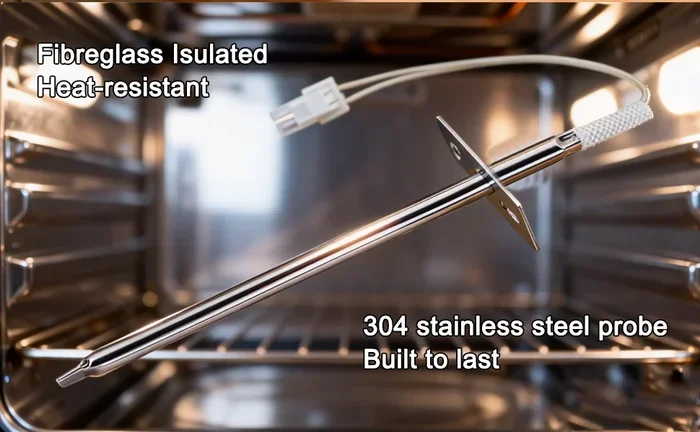
Most modern ovens come with a built-in temperature probe. This is a thin metal rod that sticks up from the back or top of the oven cavity. You insert it into your meat or dish before cooking. The probe reads the internal temperature and sends that data back to the oven’s control panel.
Here is how the system typically works:
- The probe sensor measures heat inside the food.
- The data travels through a wire to the oven’s main control board.
- The display shows the current temperature in real time.
- When the food reaches your target temperature, the oven beeps to alert you.
Some ovens use a wireless meat thermometer instead. These connect to a app or a separate receiver. But the basic idea is the same. The probe detects doneness and signals that the cooking is complete.
The probe is connected to the oven’s roast function or meat probe mode. When you select this mode, the oven adjusts its heat automatically to reach your desired internal temperature. This is great for slow roasts and precise cooking. But it also means the oven is actively monitoring, which is why the alarm sounds when the target is reached.
Types Of Oven Probes
Not all probes are the same. Different ovens use different probe designs, and each one has a slightly different way of being turned off.
- Fixed Probes: Built into the oven wall. You cannot remove them. These are common in higher-end models.
- Removable Probes: Detach from the oven cavity. You insert them into food manually. These are found in many standard ranges.
- Wireless Probes: Use Bluetooth or Wi-Fi to connect to a phone or separate receiver. Brands like GE Profile and Samsung Smart Oven often use these.
- Leave-In Thermometers: Separate devices that sit inside the oven but connect to an external display.
Knowing which type your oven has helps you figure out the right way to turn off probe on oven. Fixed probes usually have a dedicated button. Removable probes often need you to unplug or disconnect them. Wireless probes may require you to pause or stop the monitoring app.
Step-By-Step Guide To Turn Off The Probe
Now for the part you have been waiting for. Here is exactly how to turn off probe on oven in different situations. Follow the steps that match your oven type.
Method 1: Using the Control Panel
Most ovens with a digital display let you disable the probe right from the front panel. This is the most common method and works for brands like Whirlpool, Maytag, and Frigidaire.
- Look at your oven’s control panel. Find the button labeled Probe, Meat Probe, or Temperature Probe.
- Press that button once. The probe indicator light should turn off on the display.
- If the alarm is still sounding, press the Clear or Cancel button to silence it.
- Some models require you to hold the probe button for 3 to 5 seconds until the display shows “Probe Off” or the indicator disappears.
Quick tip: If you are not sure which button controls the probe, look for an icon shaped like a thermometer or a fork with a temperature reading. That is usually the probe function.
Method 2: Turning Off the Roast Mode
Many ovens tie the probe directly to the roast cooking mode. When you switch away from roast mode, the probe automatically deactivates.
- Press the Bake or Convection button to switch to a standard cooking mode.
- The probe setting should automatically disengage.
- The alarm will stop once the roast mode is no longer active.
- You can now set a regular bake temperature if needed.
This method is especially useful if your oven does not have a standalone probe off button. Simply switching modes does the trick.
Method 3: Unplugging or Disconnecting the Probe Wire
If your oven has a removable probe, you can physically disconnect it. This is the most direct way to turn off probe on oven for models with a detachable probe wire.
- Make sure the oven is off and cool to the touch.
- Locate the probe wire. It usually hangs from the back wall of the oven cavity.
- Gently pull the probe out of the oven. Do not yank the wire itself.
- Some models have a small connector at the back of the oven. Unplug that connector to fully disable the probe.
Be careful when handling the probe wire. The tip is delicate and can bend or break if you are rough with it. Always grip the probe body, not the thin wire.
Method 4: Using the Oven App or Smart Features
Smart ovens from brands like Samsung, LG, and GE let you control the probe through a phone app. If your oven connects to Wi-Fi, this is an easy option.
- Open your oven’s companion app on your phone.
- Go to the Cooking Settings or Probe Controls section.
- Toggle the probe off or tap Stop Monitoring.
- The alarm should silence immediately on both the app and the oven display.
This is especially helpful if you are away from the oven and the alarm is going off while you are in another room.
Why Does The Oven Alarm Keep Going Off?
Understanding why your oven alarm triggers is the first step to preventing it from happening again. The alarm is designed to help you, not annoy you. But sometimes it goes off for reasons you might not expect.
The Probe Reached Target Temperature
The most common reason is the simplest one. Your food has reached the target internal temperature you set. The oven beeps to let you know the roast is done. This is a feature, not a malfunction. If you are not ready to take the food out yet, you can simply silence the alarm and keep cooking.
The Probe Is Not Making Proper Contact
If the probe tip is not touching the meat properly, the oven may read incorrect temperatures. A loose or poorly placed probe can cause the alarm to trigger randomly or too early.
Here is how to ensure proper contact:
- Insert the probe into the thickest part of the meat.
- Avoid touching bone with the probe tip. Bone conducts heat differently and gives false readings.
- Make sure the probe is at least halfway into the food.
- Check that the probe wire is not kinked or pinched against the oven wall.
A Faulty Temperature Sensor
Over time, the probe sensor can wear out or get damaged. A faulty sensor may read temperatures incorrectly, causing the alarm to go off even when the food is not done. If you notice your probe giving inconsistent readings, it might be time for a replacement.
Signs of a failing probe sensor include:
- The display shows erratic temperature jumps.
- The alarm goes off immediately after you start cooking.
- The probe reads room temperature even when inside hot food.
- The wire near the tip looks discolored or damaged.
Steam or Grease Interference
Heavy steam or grease buildup around the probe can interfere with the sensor. This is common when cooking fatty meats or dishes that produce a lot of liquid. The moisture can cause temporary false readings and trigger the alarm unexpectedly.
Common Oven Models And Their Probe Settings
Every oven brand handles the probe a little differently. Here is a quick look at how some popular brands let you turn off probe on oven and silence the alarm.
Samsung Ovens
Samsung ovens with a Built-In Meat Probe have a dedicated probe button on the control panel. To turn it off:
- Press the Probe button once to pause monitoring.
- Press and hold the same button for 3 seconds to fully deactivate.
- Use the Clear/Off button to silence any active alarm.
Samsung smart ovens also allow you to manage probe settings through the SmartThings app. You can toggle the probe off remotely and adjust target temperatures from your phone.
LG Ovens
LG ovens often combine the probe function with the roast cook mode. To disable the probe:
- Switch from Roast mode to Bake or Convection Bake.
- This automatically turns off the probe monitoring.
- Press Cancel to silence the alarm if it is still sounding.
Some LG models have a dedicated Probe Off option hidden in the settings menu. Check your user manual for model-specific instructions.
Whirlpool and Maytag Ovens
Whirlpool and Maytag ovens typically have a straightforward probe system:
- Press the Probe button to cycle through probe options.
- Select No Probe or Probe Off from the menu.
- The probe indicator will disappear from the display.
For models with a removable probe, simply pulling the probe out of the oven cavity usually disables the function automatically.
KitchenAid Ovens
KitchenAid ovens are known for their intuitive controls. To turn off the probe:
- Tap the Probe icon on the touchscreen.
- Select Deactivate Probe from the menu.
- The alarm will stop if the probe is the source of the sound.
KitchenAid also lets you adjust the target temperature even after the probe has been set. This can help you avoid the alarm going off prematurely.
GE Ovens
GE ovens use a slightly different approach:
- Press the Cook Mode button to switch away from probe mode.
- Select Bake or Broil to override the probe setting.
- Press Clear to stop any active alarm.
GE ovens with the Precise Heat Probe feature allow you to set custom temperature alerts. You can adjust the alert threshold so the alarm does not go off as early.
Tips To Avoid Probe Alarm Frustrations
Prevention is always better than cure. Here are some practical tips to keep your oven probe working smoothly and avoid unnecessary alarm interruptions.
1. Calibrate Your Probe Regularly
Over time, oven probes can drift out of alignment. A probe that reads 10 degrees too high or too low will cause your alarm to trigger at the wrong time. Check your probe’s accuracy every few months by inserting it into boiling water (212°F at sea level) or ice water (32°F) and comparing the reading.
2. Place the Probe Correctly
Proper probe placement makes a huge difference. Insert the probe into the center of the thickest part of the meat. Avoid areas with lots of fat or bone. Good placement means accurate readings and fewer false alarms.
3. Set Realistic Target Temperatures
If you set your target temperature too close to the starting temperature, the alarm will go off almost immediately. Give yourself enough room for the temperature to rise naturally during cooking. A good rule of thumb is to set the target about 5 to 10 degrees below your desired final doneness temperature.
4. Keep the Probe Wire Clean
Grease and food residue on the probe wire can cause intermittent connection issues. Wipe the probe and wire with a damp cloth after each use. This keeps the sensor working accurately and prevents random alarms.
5. Use the Delayed Start Feature Wisely
If you use the delayed start feature, make sure the probe is active when the cooking begins. Some ovens will not activate the probe monitoring until the cook cycle starts. Double-check your settings before walking away.
6. Know When to Silence vs. When to Fix
Sometimes the alarm is telling you something real. If your probe reads an unusually high or low temperature, do not just silence the alarm and ignore it. Check your food with a separate instant-read thermometer to verify the reading. Food safety matters, and a faulty probe can give you a false sense of security.
When To Replace Your Oven Probe
Even with good care, oven probes eventually wear out. Knowing when to replace your probe saves you from constant frustration and false alarms.
Here are clear signs your probe needs replacing:
- The probe gives readings that are more than 10 degrees off from a known reference.
- The wire near the tip is visibly frayed, discolored, or damaged.
- The probe does not respond when you insert it into food.
- The alarm triggers randomly with no clear reason.
- Your oven display shows an error code related to the probe sensor.
Replacing an oven probe is usually straightforward. Most removable probes cost between $20 and $60 and can be purchased online or at appliance parts stores. Fixed probes built into the oven may require professional service. Check your oven’s warranty first, as some manufacturers cover probe replacement for free.
When shopping for a replacement, look for a probe that matches your oven model number. Universal probes are available, but a model-specific replacement ensures the best fit and most accurate readings.
Expert Insights On Oven Probe Usage
We spoke with a few professional chefs and appliance technicians to get their take on oven probe usage and common mistakes home cooks make.
Chef Maria Torres, a professional chef with over 15 years of experience, shared this insight: “The probe is one of the best tools for consistent cooking. But most people either ignore it or fight with it. Learning how your specific oven’s probe works saves so much stress in the kitchen.”
Appliance technician Dave Chen added: “I see a lot of people who think their probe is broken when really it is just a settings issue. Nine times out of ten, turning off probe on oven is just a button press away. Always check the manual before assuming something is wrong.”
These expert tips reinforce a simple truth. Your oven probe is a tool, and like any tool, it works best when you understand how to use it properly. Taking a few minutes to learn your specific model’s probe controls pays off every time you cook.
Key Takeaways
- Probe Basics: Your oven probe measures internal food temperature and alerts you when your target is reached. Understanding how it works helps you troubleshoot issues quickly.
- Multiple Ways To Turn It Off: You can disable the probe using the control panel, by switching cooking modes, disconnecting the wire, or through a smart app depending on your oven model.
- Alarm Triggers Have Reasons: The alarm sounds for a purpose. It may be telling you the food is done, the probe has a loose connection, or the sensor needs cleaning.
- Brand-Specific Methods Exist: Samsung, LG, Whirlpool, KitchenAid, and GE ovens each have their own way of managing probe settings. Knowing your model makes the process faster.
- Maintenance Prevents Problems: Regular calibration, proper placement, and keeping the probe clean help avoid false alarms and extend the life of your probe.
- Replacement Is Normal: All probes eventually wear out. Recognizing the signs early saves you from ongoing frustration and ensures your food cooks safely.
Conclusion
Learning how to turn off probe on oven is one of those small kitchen skills that makes a big difference. Once you know the right steps for your specific oven model, silencing the alarm and disabling the probe becomes second nature. No more beeping interruptions. No more guessing what button to press.
We covered everything from the basic mechanics of how your oven probe works to detailed step-by-step instructions for every major brand. You now know how to troubleshoot false alarms, prevent probe-related frustrations, and recognize when a replacement is needed. The key is to stay calm, check your control panel, and follow the steps that match your oven.
Take a few minutes today to look up your oven model and practice the method that works for you. Once you have it down, you will wonder why you ever stressed about that annoying beep. Your oven probe is there to help you cook better food. And now you know exactly how to control it.
Happy cooking, and enjoy the quiet kitchen.
Frequently Asked Questions
Can I turn off the oven probe without turning off the oven?
Yes, absolutely. Most ovens let you disable the probe while keeping the oven on for regular baking or broiling. Simply press the probe button or switch to a non-probe cooking mode. The oven will continue to work normally without the probe monitoring active.
Why does my oven alarm keep going off even after I turn off the probe?
This usually happens when the oven is still in a timer or alert mode from a previous cook cycle. Try pressing the Clear or Cancel button to reset all alerts. If the alarm persists, the oven may need a full power reset by unplugging it for 30 seconds and plugging it back in.
Is it safe to disconnect the probe wire from the oven?
Yes, it is safe as long as the oven is turned off and cooled down. Always handle the probe by its body, not the wire. If your oven has a connector at the back, gently unplug it rather than pulling the wire directly. This prevents damage to the sensor and the oven’s internal wiring.
How do I know if my oven probe is broken or just needs recalibration?
Test the probe in boiling water. It should read close to 212°F at sea level. If the reading is more than 10 degrees off, the probe may need recalibration or replacement. Check your oven manual for calibration instructions. Some models let you adjust the offset setting on the control panel.
Can I use a separate meat thermometer instead of the built-in oven probe?
Yes, you can. Many home cooks prefer using a standalone digital meat thermometer because they offer more flexibility and accuracy. Simply turn off the built-in probe and use your external thermometer to check food temperatures. This also eliminates any probe-related alarms from the oven entirely.
Do all smart ovens let you control the probe through an app?
Most smart ovens from major brands like Samsung, LG, and GE offer app-based probe controls. However, the exact features vary by model. Check your oven’s specifications or download the brand’s companion app to see if probe management is supported. Not all smart oven features work with every model, so verify compatibility before relying on app controls.
=== FAQS ===