How To Unlock Samsung Oven After Self Clean Process
Learning how to unlock Samsung oven after self clean is easier than most people think. The self-clean cycle heats the oven to extreme temperatures, which activates a safety lock that keeps the door sealed until it cools down. This guide covers every method to reset the lock, from simple waiting periods to power resets and control panel tricks, so you can get back to cooking without calling a technician.
You just finished running the self-clean cycle on your Samsung oven. The smell is gone, the racks look great, and you are ready to cook dinner. Then you try to open the door and it will not budge. The oven is locked tight. Panic sets in. Did the self-clean break the oven? Is the door stuck forever? Relax. This is completely normal, and there is a very good chance you can fix it yourself in just a few minutes.
Samsung ovens are designed with a safety lock that engages during the self-clean cycle. The temperatures inside can reach 900 degrees Fahrenheit or more. The lock prevents anyone from opening the door and getting burned by superheated surfaces or steam. Once the cycle ends, the oven needs time to cool down before the lock releases. But sometimes, things do not go as planned. The lock stays engaged even after the oven has cooled. That is where this guide comes in.
In this article, we will walk you through every method to unlock your Samsung oven after a self-clean cycle. We will cover why the lock happens, how long to wait, what reset steps to try, and when it is time to call for help. Whether you have a Samsung range, a wall oven, or a combo unit, these steps apply to most models.
Key Takeaways
- The lock is a safety feature: Samsung ovens lock automatically during and after self-clean to prevent burns from extreme heat.
- Waiting is the easiest fix: Most ovens unlock on their own once the interior temperature drops below a safe range.
- A power reset often works: Turning the oven off and unplugging it for a few minutes can reset the control board.
- The control lock button may help: Some models have a dedicated lock button that can be toggled to release the door.
- Know when to call a pro: If the door stays locked after trying all methods, the latch mechanism or control board may need professional repair.
- Prevention is simple: Avoid starting self-clean right before you need the oven, and always let it cool completely.
📑 Table of Contents
- Why Does the Samsung Oven Lock After Self Clean?
- How Long Should You Wait Before Opening the Door?
- Step-by-Step Methods to Unlock Your Samsung Oven
- Common Mistakes That Keep the Oven Locked
- When Should You Call a Professional?
- Preventing Future Lock Issues
- Comparison Table: Unlock Methods at a Glance
- Understanding Your Samsung Oven Model
- Final Thoughts
Why Does the Samsung Oven Lock After Self Clean?
The self-clean feature is one of the most convenient functions on a modern Samsung oven. It uses extreme heat to burn off food residue and grease without any chemicals. But that extreme heat creates a safety risk. The oven door must stay sealed during the entire process to prevent burns, smoke exposure, and accidental contact with hot surfaces.
The Thermal Lock Mechanism
Samsung ovens use a thermal lock system. This is a safety feature built into the door latch assembly. When the oven reaches high temperatures during the self-clean cycle, a thermal sensor triggers the lock. The latch engages and the door cannot be opened. This is not a malfunction. It is exactly how the oven is supposed to work.
The lock stays engaged as long as the interior temperature remains above a certain threshold. Most Samsung ovens will not unlock until the temperature drops below 600 degrees Fahrenheit. Some models require the temperature to fall even lower, around 200 degrees Fahrenheit, before the latch releases.
Control Lock vs. Thermal Lock
It is important to understand the difference between a thermal lock and a control lock. A thermal lock is the safety mechanism we just discussed. It is automatic and temperature-based. A control lock, on the other hand, is a feature you can activate manually. It locks the control panel so that buttons do not get pressed accidentally. Sometimes a control lock can interfere with the door lock indicator, making it look like the oven is still thermally locked even when it is cool enough to open.
Knowing which lock is active helps you choose the right unlock method. If the oven is still hot, you are dealing with a thermal lock. If the oven is cool but the door will not open, the control lock may be the culprit.
How Long Should You Wait Before Opening the Door?
The simplest answer to unlocking your Samsung oven is to wait. Patience is the most important tool in this process. The self-clean cycle typically lasts between 2 and 4 hours depending on the model and soil level. After the cycle ends, the oven enters a cool-down phase.
Most Samsung ovens need at least 30 minutes to cool down enough for the thermal lock to release. Some models may take up to an hour or even longer, especially if the self-clean was set to a heavy-duty cycle. The display panel will usually show a countdown or a cool-down indicator. Watch for this. It tells you the oven is still cooling.
Do not try to force the door open. Forcing it can damage the latch mechanism, the hinges, or the door glass. It can also void your Samsung warranty if the damage is traced back to user interference. Let the oven do its thing and cool down naturally.
Quick Tips for the Waiting Period
- Do not open the kitchen windows: While it might be tempting to ventilate, the cool-down process works best in a closed kitchen. The oven needs to dissipate heat evenly.
- Keep pets and children away: Even though the self-clean cycle is over, the exterior of the oven can still be very hot.
- Check the display panel: Most Samsung models show a lock icon or a cool-down message on the display. Wait until this disappears.
- Do not press any buttons: Pressing buttons during the cool-down phase can reset the timer and delay the unlock process.
Step-by-Step Methods to Unlock Your Samsung Oven
If waiting does not do the trick, or if the oven has cooled down but the door is still locked, do not worry. There are several proven methods you can try. Let us go through them one by one.
Method 1: The Power Reset
A power reset is the most common fix for a Samsung oven that will not unlock after self-clean. This method clears the control board and resets the lock system. Here is how to do it:
- Turn the oven off using the power button or the dial.
- Unplug the oven from the wall outlet. If the oven is hardwired, turn off the circuit breaker that supplies power to it.
- Wait at least 5 minutes. This gives the control board enough time to fully reset.
- Plug the oven back in or turn the breaker back on.
- Wait for the display panel to light up and show the home screen.
- Try opening the door gently.
This method works because the control board sometimes gets stuck in a lock state even after the oven has cooled. A full power cycle clears this error state and allows the latch to release normally.
Method 2: Toggle the Control Lock
Many Samsung ovens have a control lock feature. This locks the buttons on the display panel to prevent accidental presses. But it can also affect the door lock indicator. If the control lock is active, the oven may display a locked icon even when the thermal lock has released.
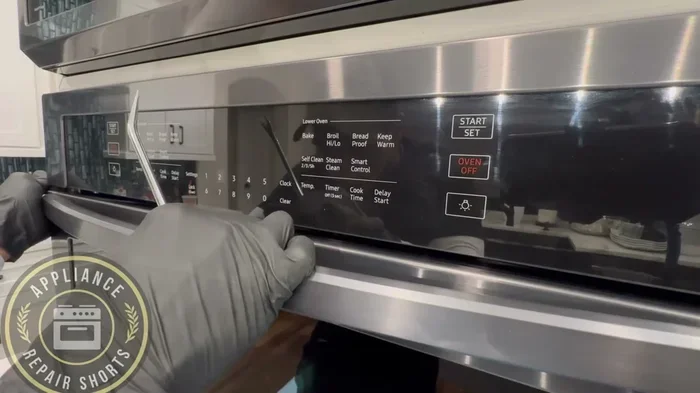
To toggle the control lock, look for the lock icon on your display panel. On most Samsung models, you can activate or deactivate the control lock by holding down the lock button for 3 to 5 seconds. The exact button varies by model. Some models use the self-clean button, while others have a dedicated padlock icon.
Once you toggle the control lock off, try opening the door again. This simple step resolves the issue more often than people expect.
Method 3: The Door Release Trick
Some Samsung oven models have a manual door release mechanism hidden behind the control panel or inside the oven light housing. This is a small tab or lever that you can pull to manually release the latch in case of a power failure or a control board error.
Check your Samsung oven manual for the location of this release mechanism. It is usually found in the section about the self-clean feature or the door lock assembly. If you no longer have the manual, you can search for a PDF version online using your exact model number.
Use this method gently. The manual release is designed for emergencies and should not be used as a regular unlock method.
Method 4: Steam Release Technique
After a self-clean cycle, there is often residual steam trapped inside the oven cavity. This steam can keep the lock engaged even after the temperature has dropped. The steam release technique helps vent this trapped moisture and can speed up the unlock process.
Here is how to do it safely:
- Wait until the oven is cool to the touch on the outside.
- Place a towel over the door to absorb any steam that escapes.
- Gently tap the door a few times to help release any vacuum seal that may have formed.
- Try opening the door a crack to let remaining steam escape.
- Wait 2 to 3 minutes, then try opening the door fully.
This method works especially well for ovens that were cleaned with a heavy soil setting, which produces more steam and residue.
Common Mistakes That Keep the Oven Locked
Sometimes the reason the oven stays locked has nothing to do with the self-clean cycle itself. It is often caused by simple mistakes that anyone can make. Here are the most common ones to avoid.
Forcing the Door Open
This is the number one mistake people make. When the door will not open, the natural instinct is to pull harder. This can bend the door hinges, crack the glass, or damage the latch assembly. A damaged latch will cost significantly more to repair than the patience required to wait for the lock to release.
Not Waiting Long Enough
Some self-clean cycles run longer than expected, especially on heavy soil settings. If you open the oven after only 15 minutes of cooling, the interior temperature may still be too high for the lock to release. Always wait until the oven is completely cool before attempting to open the door.
Ignoring the Display Panel
The display panel on your Samsung oven gives you important clues about the lock status. If you see a lock icon, a cool-down message, or an error code, read it carefully. Ignoring these messages can lead to unnecessary troubleshooting and frustration.
Using the Wrong Unlock Method
Not every unlock method works on every Samsung model. Using a method designed for a different model can sometimes make the problem worse. Always refer to your specific model’s manual before trying advanced unlock techniques.
When Should You Call a Professional?
Most of the time, you can unlock a Samsung oven after self-clean using the methods described above. But there are situations where professional help is the right call.
If you have tried the power reset, the control lock toggle, and the steam release technique, and the door still will not open after the oven has fully cooled, there may be a hardware issue. The door latch assembly, the thermal sensor, or the control board could be malfunctioning. These are not DIY repairs. Attempting to fix them yourself can be dangerous and may void your warranty.
Here are clear signs that it is time to call a professional:
- The door remains locked even after the oven has cooled for over an hour.
- The display panel shows an error code that does not go away after a power reset.
- You hear a clicking or grinding noise when you try to open the door.
- The door latch feels loose or damaged to the touch.
- The oven has been used for self-clean multiple times in a row and the lock now stays engaged permanently.
Before calling for service, have your model number ready. You can find this on a sticker inside the oven door frame or on the back of the unit. Samsung customer support can also walk you through additional troubleshooting steps over the phone before scheduling a service visit.
Preventing Future Lock Issues
The best way to deal with a locked Samsung oven is to prevent the issue from happening in the first place. A few simple habits can save you time and frustration every time you run the self-clean cycle.
Schedule Self-Clean at the Right Time
Do not start a self-clean cycle right before you need to use the oven for cooking. The entire process, including cool-down, can take 3 to 5 hours. Plan your cleaning sessions for times when you do not need the oven for several hours, such as early morning or late evening.
Clean Up Large Residue Before Running Self-Clean
The self-clean cycle works best on light to moderate soil. If there is a large spill or a thick layer of grease, remove as much as you can with a damp cloth before starting the cycle. This reduces the amount of smoke and steam produced, which in turn reduces the likelihood of a prolonged lock.
Use the Light Soil Setting When Possible
Samsung ovens often offer multiple self-clean settings, including light, medium, and heavy soil. The light soil setting uses lower temperatures and shorter run times, which means less heat buildup and a faster cool-down. This can significantly reduce the time the door stays locked.
Keep the Ventilation Clear
During the self-clean cycle, the oven vents heat and smoke through the rear or bottom vents. Make sure these vents are not blocked by nearby cabinets, towels, or other objects. Proper ventilation helps the oven cool down more evenly and prevents the lock from staying engaged longer than necessary.
Comparison Table: Unlock Methods at a Glance
| Method | Difficulty | Time Required | Best For |
|---|---|---|---|
| Waiting for Cool-Down | Very Easy | 30-60 minutes | Thermal lock after normal cool-down |
| Power Reset | Easy | 10-15 minutes | Control board stuck in lock mode |
| Toggle Control Lock | Very Easy | 1-2 minutes | Control lock interfering with door lock |
| Manual Door Release | Moderate | 5-10 minutes | Emergency unlock when power is not available |
| Steam Release Technique | Easy | 5-10 minutes | Trapped steam keeping latch engaged |
| Professional Service | N/A | 1-3 days (scheduling) | Hardware failure or persistent lock issue |
Understanding Your Samsung Oven Model
Samsung makes a wide range of ovens and ranges, and the lock mechanism can vary slightly between models. Built-in wall ovens, slide-in ranges, and freestanding ranges all have slightly different door latch designs. However, the fundamental lock-and-release process remains the same across the board.
If you are unsure about your specific model, check the user manual or visit the Samsung support website. Entering your model number brings up detailed instructions for the self-clean cycle and the door lock system. Samsung also has a helpful mobile app that can walk you through troubleshooting steps specific to your appliance.
Some newer Samsung models have smart features that allow you to monitor the self-clean cycle and lock status from your smartphone. If you have a smart Samsung oven, check the app before calling for service. It may provide real-time updates on the cool-down progress and the lock status.
Final Thoughts
A locked Samsung oven after self-clean is not a broken oven. It is a safety feature doing exactly what it was designed to do. The lock protects you from burns and injuries during the high-heat cleaning process. Once the oven cools down, the lock should release on its own. If it does not, the methods in this guide give you everything you need to resolve the issue quickly and safely.
Remember to be patient. Do not force the door. Try the power reset and control lock toggle first. Use the steam release trick if needed. And if nothing works, do not hesitate to call a Samsung-certified technician. Your safety and the longevity of your appliance matter more than saving a few minutes.
With the right approach, unlocking your Samsung oven after a self-clean cycle is a straightforward process. You now have the knowledge and the tools to handle it confidently the next time it happens.
Frequently Asked Questions
How long does a Samsung oven stay locked after self-clean?
Most Samsung ovens unlock within 30 to 60 minutes after the self-clean cycle ends. The exact time depends on the model, the soil level setting, and the ambient temperature in your kitchen. Always wait until the oven is cool to the touch before attempting to open the door.
Can I force open my Samsung oven door after self-clean?
No, you should never force the door open. Forcing it can damage the door hinges, the latch mechanism, and the glass. It can also void your Samsung warranty. Always wait for the thermal lock to release naturally or use the safe unlock methods described in this guide.
Why does my Samsung oven door still say locked after cooling down?
If the door still shows as locked after the oven has cooled, the control lock feature may be active. Try toggling the control lock off by holding the lock button on the display panel for 3 to 5 seconds. If that does not work, try a power reset by unplugging the oven for 5 minutes.
Is it safe to use the oven immediately after unlocking it?
Yes, once the door unlocks and the oven has cooled to room temperature, it is safe to use normally. If the oven was just self-cleaned, the interior may still have some residual ash or residue. Wipe it out with a damp cloth before cooking.
What error codes appear on Samsung ovens with a stuck lock?
Common error codes related to a stuck lock include SE, dE, and F1. These codes usually indicate a control board error or a door latch sensor issue. A power reset often clears these codes. If the error persists, contact Samsung support or a certified technician.
Can I prevent the oven from locking during self-clean?
No, the lock during self-clean is a built-in safety feature and cannot be disabled. It is designed to protect you from extreme heat. The best approach is to plan your self-clean sessions for times when you do not need the oven for several hours, allowing plenty of time for the cool-down and unlock process.
=== CONCLUSION ===
Unlocking a Samsung oven after the self-clean process is a simple task once you understand how the lock system works. Whether you need to wait for the thermal lock to release, perform a power reset, or toggle the control lock, the solutions are straightforward and safe. The key is patience and following the right steps in the right order. With the methods covered in this guide, you can handle a locked oven door confidently and get back to cooking without stress. Keep this article bookmarked for the next time your Samsung oven locks up after self-clean, and you will always know exactly what to do.