How To Turn Off Sabbath Mode On Your Lg Oven Easily
Turning off Sabbath mode on your LG oven is simple once you know the right steps. This guide walks you through the exact process for most LG oven models with clear instructions and helpful tips. You will learn what Sabbath mode does, why it activates, and how to disable it in just a few minutes.
Have you ever walked up to your LG oven and found it stuck in Sabbath mode? You are not alone. Many oven owners face this confusing situation and wonder what went wrong. The good news is that fixing it is much easier than you think. This guide will show you exactly how to turn off Sabbath mode on your LG oven in just a few simple steps.
Whether you accidentally pressed the wrong button or someone else changed the settings, getting your oven back to normal is quick. We will cover everything you need to know. From understanding what Sabbath mode does to fixing common problems, this article has you covered. Let us dive right in and get your oven working the way it should.
Key Takeaways
- Sabbath mode is a special setting: It disables certain oven functions during religious observance days.
- You can turn it off easily: Most LG ovens let you disable Sabbath mode through the control panel in under two minutes.
- Check your model number: Different LG oven models may have slightly different steps to exit Sabbath mode.
- Common issues are fixable: A frozen display or unresponsive buttons usually have a simple reset solution.
- Prevention is simple: Keeping your oven settings menu organized helps avoid accidental Sabbath mode activation.
- Customer support is available: LG offers live help if you cannot resolve the issue on your own.
📑 Table of Contents
- What Is Sabbath Mode on an LG Oven?
- Why Do LG Ovens Have a Sabbath Mode?
- How To Turn Off Sabbath Mode On Lg Oven
- Common Problems When Disabling Sabbath Mode
- Tips to Avoid Accidental Sabbath Mode Activation
- When to Contact LG Customer Support
- Understanding Your LG Oven Control Panel
- Sabbath Mode vs. Other Special Oven Modes
- Final Thoughts
- Frequently Asked Questions
What Is Sabbath Mode on an LG Oven?
How Sabbath Mode Works
Sabbath mode is a special feature built into many modern ovens, including LG oven models. It is designed to help people observe religious traditions that restrict certain activities on holy days. When this mode is active, your oven changes how it behaves. It disables some functions that would normally require user interaction during the observance period.
You might also hear people call it Sabbath mode oven or Sabbath setting. Different brands use different names, but the purpose is the same. The oven allows cooking to continue without the owner needing to press buttons or adjust settings during the restricted time.
Features Activated in Sabbath Mode
When your LG oven is in Sabbath mode, several things change. Here is what typically happens:
- Oven lock activates: The control panel locks to prevent accidental button presses.
- Display changes: The screen may show a special icon or message indicating the mode is on.
- Temperature adjustments are limited: You cannot change the heat setting using the normal controls.
- Timers still work: Some ovens allow delayed start or keep-warm functions during this mode.
- Error codes may appear: If you try to change restricted settings, the oven might show a warning.
These features are helpful during observance but can be confusing when you want to use the oven normally again. That is why knowing how to turn off Sabbath mode on LG oven models matters so much.
Why Do LG Ovens Have a Sabbath Mode?
Religious Observance and Cooking Needs
The Sabbath mode oven exists to support religious practices. During certain days, traditional guidelines may prevent people from directly operating appliances. Cooking that was already started before the observance period needs to continue safely. The oven stays warm and functional without requiring the user to interact with the controls.
LG designs its ovens with this feature because many families value it. It shows respect for diverse cultural and religious needs. The company includes this setting across many of its LG range and built-in oven models.
How It Affects Oven Settings
When Sabbath mode is on, your oven settings menu changes. Some options become grayed out or unavailable. The oven may only allow basic functions like keeping food warm or maintaining a low temperature. This is intentional and part of the design.
It is important to understand that this is not a malfunction. Your oven is working exactly as it should. The challenge comes when you want to switch back to normal operation. That is where knowing the right steps makes all the difference.
How To Turn Off Sabbath Mode On Lg Oven
Now let us get to the main part. Learning how to turn off Sabbath mode on LG oven is straightforward. Follow these steps carefully and your oven will be back to normal in no time.
Step-by-Step Guide
Here is the general process that works for most LG oven models. Always check your specific model manual if these steps do not match exactly.
- Press and hold the Sabbath button: On many LG ovens, there is a dedicated Sabbath button on the control panel. Press and hold it for about three to five seconds.
- Look for the display change: The screen should show a message like “Sabbath Off” or the Sabbath icon should disappear.
- Release the button: Once the display changes, let go of the button.
- Check the oven settings: Try adjusting the temperature or selecting a cooking mode to confirm the mode is off.
- Lock the oven door: If the door lock was engaged during Sabbath mode, it should release once the mode is disabled.
These steps work for most LG oven models released in the last decade. If your oven does not have a dedicated Sabbath button, do not worry. There are other methods we will cover below.
Model-Specific Instructions
Different LG oven models have slightly different ways to exit Sabbath mode. Here are a few common variations:
- Models with a Settings Menu: Press the Settings button, scroll to “Sabbath Mode,” and select “Off.”
- Models with a Control Lock: Press and hold the Control Lock button for five seconds. This often resets the oven and disables Sabbath mode.
- Models with a Timer Button: Press and hold the Timer button for three seconds to toggle Sabbath mode off.
- Double Oven Models: Check both oven sections. Sometimes Sabbath mode is active on only one oven.
Your model number is usually found on a sticker inside the oven door or on the back of the unit. Use this number to look up the exact instructions in your owner’s manual or on the LG support website.
Quick Tips for Success
Here are some helpful tips to make the process smoother:
- Make sure the oven is cool: If the oven is very hot, wait for it to cool down before changing settings.
- Check the power supply: Ensure the oven is properly plugged in and receiving power.
- Use the owner’s manual: Your manual has the exact steps for your specific model.
- Try a power reset: Unplug the oven for one minute, then plug it back in. This can reset the control panel.
- Be patient with the buttons: Hold buttons for the full recommended time. A quick tap may not register.
Common Problems When Disabling Sabbath Mode
Sometimes things do not go as smoothly as we hope. Here are the most common issues people face and how to fix them.
Oven Still in Lock Mode After Disabling Sabbath
If your oven door remains locked even after you turn off Sabbath mode, the control lock may still be active. Try pressing and holding the Lock button for five seconds. This should release the door lock and allow you to open the oven door normally.
Another option is to unplug the oven for two minutes and then plug it back in. This hard reset often clears any lingering lock settings. Once the oven powers back on, check if the door unlocks automatically.
Display Not Responding
A frozen or unresponsive display can happen when Sabbath mode gets stuck. This is more common in older LG oven models. Try these steps:
- Press and hold the Cancel button for ten seconds.
- Unplug the oven, wait two minutes, and plug it back in.
- Press the Power button to restart the control panel.
If none of these work, the issue might be with the control board itself. In that case, contacting LG support is the best next step.
Oven Shows Error Codes
Some LG oven models display error codes when you try to change settings during or after Sabbath mode. Common codes include F1, F2, or F3. These codes usually mean the control panel is confused about the current mode.
A simple reset often clears these codes. Turn off the oven at the circuit breaker for five minutes, then turn it back on. The error codes should disappear, and you can try disabling Sabbath mode again.
Tips to Avoid Accidental Sabbath Mode Activation
Once you have successfully turned off Sabbath mode, you probably want to avoid this happening again by accident. Here are some practical tips:
- Know where the Sabbath button is: Familiarize yourself with the control panel layout. Knowing which button to avoid saves trouble.
- Use the Control Lock feature wisely: Engaging the control lock prevents accidental button presses, including the Sabbath button.
- Keep the manual handy: Store your oven manual in a safe place. You can also find it online on the LG website.
- Label the control panel: If you have children or guests who might accidentally press buttons, a small label can help prevent confusion.
- Check settings after cleaning: Sometimes cleaning the oven control panel can trigger mode changes. Always double-check your settings after a deep clean.
Taking these small precautions can save you a lot of frustration in the future. A few minutes of preparation goes a long way in keeping your oven running smoothly.
When to Contact LG Customer Support
If you have tried all the steps above and your LG oven is still stuck in Sabbath mode, it is time to reach out for help. LG has a dedicated customer support team that can walk you through model-specific troubleshooting.
Before you call, have your model number ready. You will also want to note any error codes displayed on the screen. This information helps the support team diagnose the issue faster and provide the right solution.
You can contact LG support through their website, by phone, or through their mobile app. Most users find that the phone support is the fastest way to get help. The team is trained to handle oven settings questions and can guide you through even the most complex troubleshooting steps.
Understanding Your LG Oven Control Panel
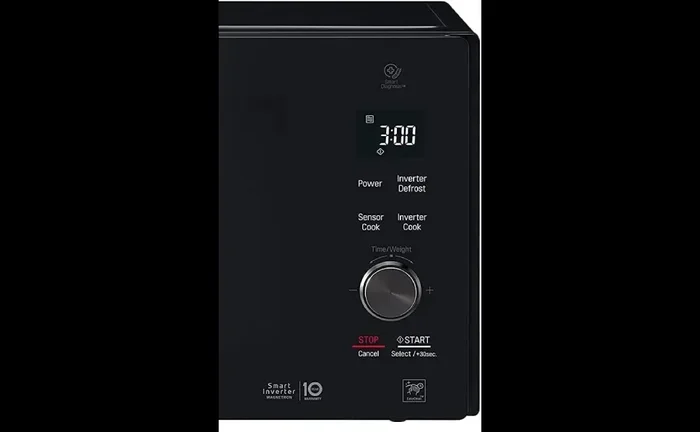
Getting to know your LG oven control panel makes managing settings much easier. The panel includes buttons for temperature, cooking modes, timers, and special features like Sabbath mode. Each button serves a specific purpose.
Take a few minutes to explore the panel when you have time. Press each button gently and read the labels. Understanding what each button does helps you navigate the settings menu with confidence. It also makes it much easier to fix issues like accidentally activating Sabbath mode in the future.
The control panel layout varies by model. Some LG oven models use touch buttons while others have physical knobs and digital displays. No matter the type, the basic principles for turning off Sabbath mode remain the same.
Sabbath Mode vs. Other Special Oven Modes
It is worth noting that Sabbath mode is not the only special mode on LG ovens. Here is how it compares to a few other modes:
- Self-Clean Mode: This mode heats the oven to very high temperatures to burn off grease and food residue. It locks the door during the cycle.
- Child Lock Mode: This disables the control panel to prevent children from accidentally turning on or changing oven settings.
- Keep Warm Mode: This maintains a low temperature to keep cooked food warm until serving time.
- Proof Mode: Found on some models, this provides a low, steady temperature ideal for bread dough proofing.
Each mode serves a different purpose. However, they all share one thing in common. They can be turned off using similar steps on the control panel. Once you learn how to manage one special mode, the others become much easier to handle.
Final Thoughts
Learning how to turn off Sabbath mode on LG oven is a skill every oven owner should have. It takes just a few minutes and saves you from unnecessary frustration. Whether you use the Sabbath button, the settings menu, or a power reset, you now have all the tools you need.
Remember that your LG oven is designed to be user-friendly. The Sabbath mode feature is helpful when you need it, and easy to disable when you do not. Keep this guide bookmarked for future reference. And if you ever get stuck, LG customer support is always ready to help.
Take a moment today to familiarize yourself with your oven’s control panel. A little knowledge now can prevent a lot of confusion later. Your oven is an essential part of your kitchen, and keeping it running smoothly makes daily life so much easier.
Frequently Asked Questions
How do I know if my LG oven is in Sabbath mode?
Your oven display will show a Sabbath icon or the word “Sabbath” on the screen. The control panel may also be locked, and some cooking options will be grayed out. If you see these signs, your oven is likely in Sabbath mode.
Can I turn off Sabbath mode without the owner’s manual?
Yes, you can. Most LG ovens allow you to turn off Sabbath mode by pressing and holding the Sabbath button for three to five seconds. If that does not work, try the Settings menu or a power reset by unplugging the oven for two minutes.
Why does my LG oven keep going back to Sabbath mode?
This can happen if the control panel has a glitch or if the oven was not fully reset after the last time you turned it off. Try unplugging the oven for five minutes and plugging it back in. If the problem continues, contact LG support for further assistance.
Is it safe to use the oven while in Sabbath mode?
Yes, it is safe. Sabbath mode is designed to keep the oven functioning for cooking purposes. The oven maintains temperature and operates normally. It simply restricts certain button functions to comply with religious observance guidelines.
Do all LG oven models have a Sabbath mode?
Not all models have this feature. Sabbath mode is more common in newer LG oven models and ranges sold in certain regions. Check your owner’s manual or look up your model number on the LG website to confirm whether your specific model includes this feature.
What should I do if none of the steps work?
If you have tried all the steps and your oven is still in Sabbath mode, it is best to contact LG customer support. They can provide model-specific troubleshooting and may arrange a service visit if needed. Having your model number ready will speed up the process significantly.